


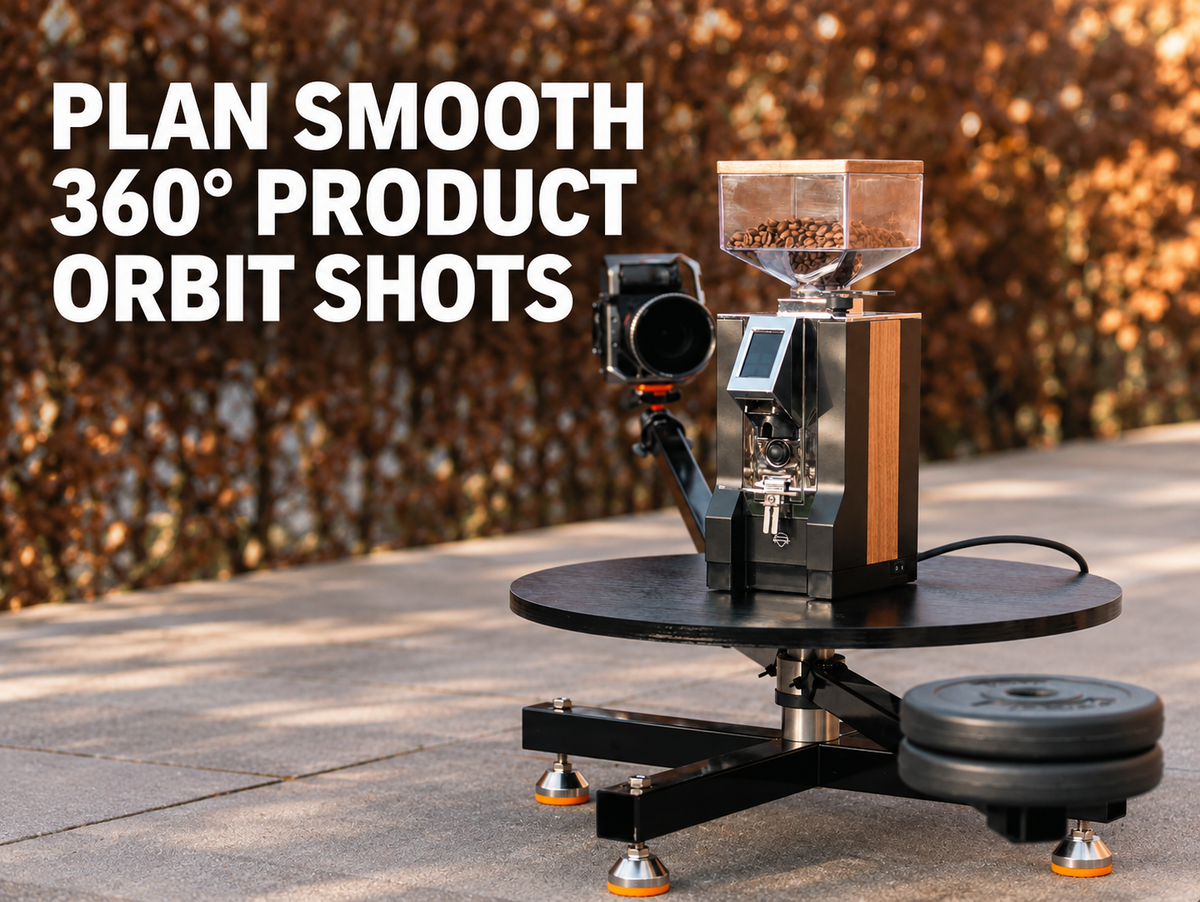
Keep the product fixed, give the camera a clear circular path, and repeat one controlled move for smooth orbit footage. Camera motion control helps you hold a consistent distance, angle, and travel speed around the product.

Decide Whether a Camera Orbit Fits the Product Shot
A camera orbit fits products that need several sides shown in one continuous shot. It works especially well for products with visible texture, shape, controls, ports, layered parts, or reflective details.
The 360 Degree Spinner Standard Version keeps the product in place while its camera arm moves around the subject on a repeatable circular path.
Compared with a traditional product turntable that rotates the item, a fixed-product camera orbit offers three practical advantages:
- Fewer placement limits: A rotating turntable can create wobble or spills around liquid-filled containers, easy-to-tip items, loose accessories, or complex styled scenes. A fixed product avoids rotation at the product level.
- Faster framing and centering: A turntable often requires repeated product adjustments to keep the subject centered during rotation. With a camera orbit, you can fine-tune the camera arm for a faster alignment check.
- More flexible lighting and background control: Fixed lights, props, and background elements can stay around the scene while the camera moves. That layout gives you more control over highlight movement, shadows, and visual transitions.
A full orbit works well for a hero clip. A shorter arc can reveal depth and side details with a simpler setup. Keep the move only as long as the product needs, so every degree of movement reveals a useful detail or strengthens the visual flow.

Prepare a Stable Product Position and a Clear Shooting Area
A stable product position keeps every orbit pass consistent. Prepare the product area before mounting the camera, then leave all markers in place until filming ends.
- Place the product on a level table, pedestal, or floor surface.
- Mark the product position with low-tack tape after final framing.
- Secure loose accessories that could shift during movement.
- Remove unused stands, boxes, and loose cables from the camera path.
- Leave a clear route for the operator and support system.
- Check that the backdrop stays clean through the full circle.
A product that shifts even slightly can create a visible jump between takes. A clear shooting area also gives you room to repeat the shot after a lighting or focus adjustment.
Mount the Camera and Check the Orbit Clearance
A centered camera mount keeps the product at a steady distance through the orbit. Check every part of the path before recording so the camera, support, and operator have enough room.
- Set camera height near the feature you want to show.
- Check clearance around the lens, camera body, support, and product.
- Walk the entire route at recording speed.
- Look for table corners, light stands, backdrop supports, and floor cables.
- Check focus near the closest and farthest points of travel.
- Leave enough space for a safe return to the opening position.
Our 360 Degree Spinner Standard Version moves the camera around a stationary subject on a repeatable circular path. The listed base capacity is 330 lb, while the listed camera-side support is up to 12 lb. That combination supports product shoots, portraits, small furniture, and compact equipment within the stated limits.
Under safe operating conditions, a person can stand on the base for portrait, lifestyle, and dynamic orbit shots. Place the base on a level, dry floor, keep the person centered, lock every connection, clear the camera path, and use close supervision during filming. Avoid jumping, sudden weight shifts, unsafe footwear, and unapproved accessories.
With the Extension Kit connected to the Main Part, 48-inch extension poles and a 20 x 41 inch background bracket can support wider camera paths, full-body portraits, 3D body scanning, and bullet-time-style shots with suitable camera accessories.

Use a Consistent Starting Angle and Direction of Travel
A marked starting angle and one travel direction keep related clips easy to match. Use the same route for every color, size, or product version in the shoot.
Mark the Opening Position
Place a small tape mark on the floor or use a fixed point on the background. Frame the product from that point, then record a still reference image for later setup checks.
Choose an opening angle that shows the main product face. A label, front panel, logo area, or key feature can give the clip a clear visual beginning.
Keep One Direction and Pace
Choose clockwise or counterclockwise travel before recording. Keep camera speed steady from the opening frame through the final frame.
Practice the move once before recording. A controlled pace gives your editor more freedom to trim or slow the clip.
A repeatable route helps you recover quickly after a battery change or product swap. It also gives the final edit a more consistent visual rhythm.
Control Reflections and Background Edges With Lighting
Large soft light sources help you control reflections and background changes during a camera orbit. Check the full route on a monitor because a clean front angle can reveal distractions farther around the product.
Manage Glossy Surfaces
Glass, polished metal, screens, and glossy plastic can reflect the room. Move the light slightly, raise it, or soften it until the reflection becomes a clean highlight rather than a visible room element.
Watch how the highlight moves across the product. A reflection can help show shape when it travels smoothly and stays away from labels or important details.
Check Background Boundaries
Look for backdrop edges, wall corners, windows, and open doors through the full camera path. Keep the product far enough from the background to create separation and reduce hard shadows.
A simple background keeps attention on product shape and detail. Background consistency also makes color correction easier across several clips.
Review Product Shadows
Product shadows can add depth, but their direction should stay intentional. Check the far side of the orbit for shadows that cross labels, controls, or texture details.
Use a gentle fill light if one side becomes too dark. Keep the fill subtle so the product retains shape.
Lighting needs a full orbit check, not a front-angle check alone. Record a quick test pass after any light movement.

Test the Shot Before Recording the Final Pass
A short test pass catches problems before the final take. Record a few seconds, review the result at full size, and adjust one issue at a time.
- Check that the product stays in the intended frame position.
- Watch for speed changes during camera travel.
- Check focus at the nearest and farthest points.
- Look for reflections, background edges, and camera shadows.
- Confirm that cables stay outside the shot.
- Review exposure as the camera reaches the side and rear angles.
- Record a second test after major adjustments.
Keep one approved test clip as a visual reference. It can help you match framing and exposure after a product or battery change.
Create Smooth Product Orbit Shots With a Controlled Camera Path
A controlled camera path turns an orbit from a simple movement into a useful product view. Keep the product fixed, clear the full route, mark the opening angle, and test every light reflection before the final pass. Use camera motion control when product shape and side details deserve one continuous view. Compare your product size, available floor space, camera setup, and preferred orbit length before choosing the support system for your next shoot.

FAQs
Q1: What Should You Check Before Choosing a Camera Orbit System?
Check the total camera rig weight, mounting interface, required orbit radius, and available studio floor space. Add the camera body, lens, battery, cage, monitor, and mounting plate. A system that fits the complete rig and working area gives you a more repeatable setup across different product shoots.
Q2: When Is an Extension Kit Useful for a Circular Camera Path?
An extension kit is useful when a longer radius helps show a larger item, gives the camera more clearance, or creates a gentler perspective change with a longer lens. It can also support portrait and dynamic rotation content with more room around a standing subject.
Under safe operating conditions, a person can stand on the spinner base during filming. Use a level, dry floor, keep the subject centered, lock every connection, and clear the camera path.
Q3: Why Does Quiet Operation Matter During a Product Shoot?
Quiet operation matters when you record live product sound, voiceover on set, or close ambient audio. A quieter motion system reduces the chance of mechanical noise entering the clip. It also keeps the shooting environment calmer during repeated takes, especially in small studios where sound can reflect from nearby walls.
Q4: What Camera Weight Should You Count Before Choosing an Orbit Setup?
Count every item on the moving camera side. A mirrorless camera body often weighs 1.5 to 3 lb, a lens 0.5 to 3 lb, a battery 0.2 to 0.5 lb, a cage 0.5 to 1 lb, a monitor 0.5 to 1.5 lb, a microphone and receiver 0.3 to 0.8 lb, and a mounting plate 0.2 to 0.5 lb.
A typical fully built mirrorless rig can reach about 4 to 10 lb. The 360 Degree Spinner Standard Version lists camera-side support up to 12 lb, so calculate the complete rig before filming.
Q5: Does the Extension Kit Require the Main Part and What Is the Difference Between Them?
Yes. The Extension Kit must connect to the Standard Version Main Part.
- Main Part: An independent, complete camera-orbit system with a built-in 360 degree rotating base spindle and a basic camera support arm. It covers orbit shots for most regular-size subjects, including electronics, shoes, bags, cosmetics, food, and portraits.
- Extension Kit: An advanced add-on with longer high-strength extension poles, adjustable up to 48 inches in horizontal or vertical setups, plus a dedicated background bracket. It expands the camera orbit radius and shooting height for larger scenes, full-body portraits, 3D scanning, high-angle overhead shots, and faster background changes.
Share:
How to Stop Camera Shake When Shooting Video: Choosing a Stable Video Tripod